


Tuesday, June 9, 2026

Install Exchange 2016 – Part 3 – Install Mailbox Role

Now comes the easy bit! Once you have installed all the pre-requisites and updated the Active Directory correctly you can move on to installing the Exchange 2016 system itself.

My preference is always to use the command prompt and run the unattended installation. This way you can let it get on with the work rather than responding to the command cascade of ‘Next, Next, Next, Finish’ buttons! It’s obviously up to you, but here is the unattended version.

From the command prompt where you unpacked all the Exchange 2016 files from the ISO, run the following command as administrator.

.\setup /mode:install /role:mailbox /iacceptexchangeserverlicenseterms
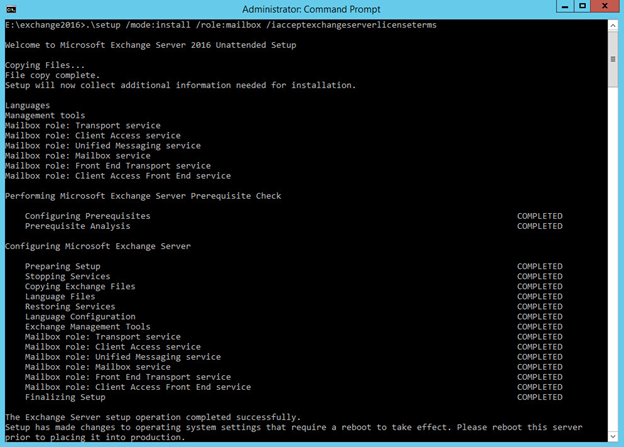

A reboot after this installation is clearly necessary. After which, move on to the configuration of your new Exchange 2016 server. Too Easy!

Mark Rochester
Mark Rochesterhttps://thecloudgeezer.com
Mark currently works in the cloud space assisting large companies to migrate from either on premises to the cloud, or cloud to cloud. His experience with Enterprise migrations spans more than 25 years which basically makes him old. However, with all the oldness creeping up he still finds technology massively exciting. Please reach out for a chat anytime you would like. :-)

Related Articles

PowerSync Pro – Full Migration Series

If you’ve ever been responsible for a Microsoft 365 tenant‑to‑tenant migration, you already know the truth: There’s the theory vendors talk about… and then...

The Cloud Geezer Coffee

Anyone who’s spent more than five minutes working in the cloud knows one universal truth: nothing happens as fast as you want it to....

Migrating Microsoft 365 Tenants End-to-End: Cloud Workloads + Workstation Reprofiling with MigrationWiz and PowerSyncPro

Tenant-to-tenant migrations in Microsoft 365 are rarely simple. You’ve got mailboxes, OneDrive, Teams, SharePoint, and Entra ID identities to move—and that’s just the cloud...

Stay Connected

88FansLike
36,999FollowersFollow
70,704SubscribersSubscribe
- Advertisement -

Latest Articles